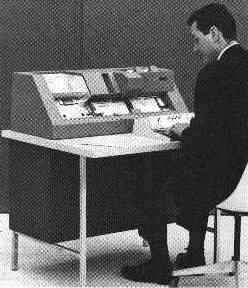
(not me in the photo!)
| Home | Music | 3D Animations | Utilities | Code | Search | Forums | About | Contact | Accessibility |
If you wish to contact me see the Contact page. You may also like to read an old more informal page here: Robert.
This page is sort of in historical order so starts with the mathematical logic, then the tilings research, then the games, and finally the software which is what I work on all the time nowadays. So if you are mainly interested in the software, skip forward towards the end of this page.
I'm a mathematician originally by training. I did research on a style of mathematics in which everything is finite, in which exceedingly large numbers take the place of the infinities that come up so often in mathematics. The idea is that mathematical infinity arises through attempting to reach exceedingly large numbers with insufficient resources, where the numbers are more than astronomically large, quite unimaginably large. But just very very very large numbers, not truly infinite.
The idea isn't to downplay infinity particularly, rather the idea is that in maths we may think we have some grasp of infinity because we can put it into our equations etc - but that the real infinity is far vaster than anything we can imagine. So in some ways it is more realistic to treat the infinities of maths as just exceedingly large numbers. The idea is, if you make truly large numbers large enough then they are indistinguishable to us from true infinities as far as maths and practical purposes are concerned.
For more about this see the page on Infinity and very large numbers.
After that I did some research into cellular automata, trying to find one with simpler rules than Conway's Game of Life that could simulate the workings of a computer and so lead to similar results to the ones Conway found for his cellular automaton. This was unsuccessful, I found some interesting patterns, promising enough to keep me at it for a number of years - but not the logic gate type interactions between the gliders I was looking for - but it got me involved in programming again after a lapse of many years since my early days learning programming on big mainframe computers with paper tape and punched cards. This was for cellular automata on a square tiling mainly though I think I also explored hexagonal tilings briefly.
Then I got involved in research into non periodic sets of tiles - tiles that can tile the plane as far as you like right out to infinity - but there is no way to put them together without gaps to make a tiling that repeats exactly. I found some new non periodic sets of tiles in 2D and 3D, but never published the results.
I tried once but realised that though my proofs were sound as far as I could tell, it needed more work to put it into a form appropriate for publication, so I got a bit discouraged at that point (I was very poor at explaining my ideas to other mathematicians, especially in print, in those days). This was clear from the reviewers' comments - I simply hadn't explained the proof in the paper as intended, as they didn't even comment on the proof but focussed only on inadequacies in other sections of the paper which were only intended as a summary of current knowledge as background for the proof. Then concluded (naturally enough) that there was insufficient new material for it to be of interest to publish it. It all makes perfect sense with hindsight. But I didn't understand then, and I was too tired at that point after a run of failures to try again or attempt to take it any further, so I gave up.
I plan to return to the research if I can at some point, and if no-one else has proved the non periodicity of the tiles yet. I did bounce the ideas of the first proof off Roger Penrose (originator of the two tile non periodic Penrose Tiles), (that would be some time around 1990 or so, not sure of the exact year), as I was doing post grad research in the Oxford maths dept at the time, and he was interested enough in my non periodicity proof to hear me out, and didn't spot any obvious flaws in it when I explained it to him.
This was another area of interest, I found tilings which had a "taxicab geometry" that in the limit got arbitrary close to ordinary euclidean geometry. I also proved that any such tiling has to be non periodic. This maybe is the first paper I'll try to publish if I get time to work on it again (and if it hasn't yet been published by anyone else) - it is the last thing I worked on before I got involved in full time software programming and is also reasonably self contained and could be not too long if written with care. I tried at an early stage, to publish it as a question in a recreational maths magazine (before I had the main theorem or the results), and got some encouraging comments about it though it wasn't actually published at that stage. I think it has a reasonable chance of being accepted for publication if I try again.
Again I found some new results in peg solitaire, particularly in higher dimensions and large boards, again not published, sorry. This could be of interest to those keen on recreational maths.
I got involved in inventing several games, board game type games I mean, some with associated software you could use to play the games on a computer (Win 3.1 programs, as this was some time ago now) - but all playable using a board and pieces. I don't want to say too much as some I may still perhaps publish them at some point, and would rather do it all in one go rather than give hints about how they work first. One was nearly published, was accepted by Gibson's Games (a fairly large games company in the UK), but unfortunately ran into production issues, and was never published. A rival game by another company in New Zealand was similar enough at least in appearance to probably hit sales - and got published world wide including in the UK soon after that, so that the prospects for my game seemed remote after that. But I still have some hopes to revive it at some point possibly.
Then I got involved in writing music software, originally to explore an idea I had for a fractal tune built up from a simple seed. This was far more successful than I expected, the results were very musical, at least many users of my programs seem to think so as I do myself too - you can judge for yourself by listening to the music that comes with the fractal player in Tune Smithy. So I tried selling the program and was encouraged further by the enthusiastic feedback from users. This is what later became Fractal Tune Smithy.
Later I added in scales from the SCALA archive with permission from Manual Op de Coul. This lead to microtonal fractal tunes. It turned out then that my program was useful for microtonal composers to retune their keyboards and pieces composed in notation software. So I developed that side of it further. I also got involved in composing small chamber type pieces of microtonal music myself which I greatly enjoyed, got encouraging positive feedback from other composers about them, and they were useful also as I could include them in the program as examples of various things you could do with the program.
It also turned out to be useful for music therapy in connection with Barbara Hero's Lambdoma keyboard - I adapted Tune Smithy so that it could be used to play the notes for her keyboard. Other spin off additions to the program include the chord progression player, the polyrhythm metronome, and the audio pitch tracer used to transcribe bird song.
Tune Smithy is my top selling program. But I also wrote some other software as well. Lissajous 3D was written in order to make Lissajous Patterns in 3D - originally for use with Tune Smithy for the music therapy connection, an implementation of ideas by Barbara Hero, and a suggestion to develop them in 3D by the composer Charles Lucy.
Virtual Flower originated in a discovery that it was possible to make very compact fractal trees in VRML - a few KB instead of the usual several MB that would be required for such complex 3D shapes. It also developed as a way to make geometrical shapes, polyhedra and animated star spheres.
Other programs I've written include the Activity Timer which is used to track time spent on projects on the computer, and Text Field Echo a text tool with a few special features - including a wild word search and replace, and search and replace all the files in a folder.
I've been programming on and off since the days of punched cards :-). My first experience of programming was with a machine like this:
(not me in the photo!)
That's just the machine for punching the cards. The computer itself occupied a large room about the size of the ground floor of a house, and was probably less powerful than the first ever home PCs.
Here is one of the patterns I explored as a mathematician (I didn't invent this particular pattern indeed all of them I found had already been invented by someone else, but I had new results about the patterns):
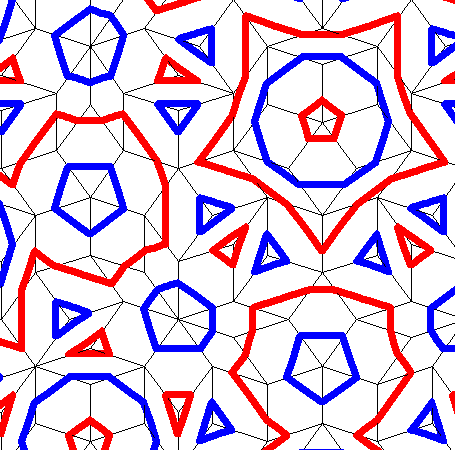
I'd love to share this program, but it isn't suitable for public release in its present form as it was written for Windows 3.1 and hasn't yet been updated. It would run okay as a 16 bit program but I need to make some changes before it could be released, and the easiest way ahead is to update it to 32 bit first, which is a bit of an undertaking. (See Porting 16-Bit Windows-Based Applications to Win32) You can see more pictures of the tiles here: Robert.
I also wrote some programs to play some board games and puzzles that I invented, and to draw and print out the pieces for the games. I still have hopes to publish these in print however rather than software (or with the software as a companion to the published game) - and the software again is all for Windows 3.1 and not updated, so for both reasons, none of my board games programs are yet in a state suitable for a public release as software.
I wrote other programs too, earlier on - the most complex of my early programs was a cellular automaton simulator for the cellular automaton research, optimised to run especially quickly by using bitwise operations (particularly fast on a 64 bit machine) so that you can quickly fast forward through the generations to see what happens. These programs are for Linux (the X-Windows system) and haven't been updated or even tested for many years now, and aren't available for download.
More about how I developed the programs that you can download here.
Fractal Tune Smithy developed out of an idea for a fractal tune I had that would continue endlessly. The first version was very basic and just played a single melodic line of notes all the same length.
However fairly early on I began to explore some of the tunings in the huge Scala scales archive in Fractal Tune Smithy. I was delighted when Manual Op de Coul gave me permission to use those scales in FTS, and then found out that FTS was doing things that few other programs could do, so it was quite in demand with some microtonal composers. I also got more and more interested in microtonal music so it developed like that.
Later I heard through Denny Genovese (who was a keen supporter of FTS) that Barbara Hero was looking for someone to do the software retuning for her Lambdoma keyboard, so through that eventually I wrote the music therapy section of the program for users of her keyboard, which then became usable also by mouse and PC keyboard. Also indirectly that lead to Lissajous 3D.
Virtual Flower developed out of an idea I had of a way to make trees in the virtual reality modelling language VRML. The fractal methods let one make trees in files of only a few kilobytes instead of the megabytes they would normally be with that level of detail. I got the idea after my nephew David King got interested in VRML and found out that normally VRML trees are MB sized files if you do them in all their detail. It also developed as a way to make geometrical shapes, polyhedra and animated star spheres.
Lissajous 3D developed from Barbara Hero's work with Lissajous patterns corresponding to musical chords. You often have chords of three or more notes in music so it was natural to extend the idea to three or more frequencies played simultaneously, but I hadn't noticed the connection that made with 3D shapes until the composer Charles Lucy pointed it out, which then lead to the idea of Lissajous 3D. Just to make it clear - the idea of a 3D Lissajous pattern isn't a new idea actually, as later on I found out that Lissajous knots figure in the mathematical discipline of knot theory, but it was new to me when I wrote the program.
Activity Timer I developed originally to keep track of the time I spent on projects myself - as with many software developers I was very prone to overwork, often late at night when everyone else is asleep - and have a great tendency to forget how long I was on the computer, so needed a software reminder to take short eye breaks from time to time, and to stop work for a longer break. Hopefully it is helpful for others in the same situation, and also for those who need or want to find the total times they spend on their various computer related activities.
Text Echo I developed to explore certain programming possibilities to see how they could be done, vis. echoing and directly editing text fields in other programs - and then it was a natural to develop it further to do certain text editing tasks I needed to do such as a flexible way to do a search and replace of multiple search terms simultaneously in all the files in a folder, and to do page redirects for all the web pages in a web site in one go. So - though there are many programs that work with text, this one does have its special points. I expect TFE to be useful for occasional fairly techy users who may have similar requirements to myself.
The text font transforming and text enlarging properties of TFE can be fun for less techy users, and it can also be used to directly read or edit text in tiny scrollable regions of web pages.
Apart from that, the main point of interest is perhaps the wild words search. Perhaps the search and replace of all the files in a folder can be useful, particularly the capability to search and replace several words or phrases simultaneously, or even to use a list of as many replacements as you like from a file, and carry them all out simultaneously on all the files in a folder and (optionally) all its sub-folders.
TFE can also be used as a text magnifier for partially sighted users, which I may develop at some point. But it isn't that great for that - as it can't echo Word documents, then there are pdfs, file names in Explorer, tables, etc etc. and unfortunately because of the approach I used, they would all need to be done as many special cases, and some of them would take a fair amount of work to code (e.g. Word documents). I'm not sure if it is sufficiently unique to be worth developing in this area given the wide range of text magnifying programs already available for partially sighted users.
Generally - I'm not sure where TFE is going and what will be developed out of it later on. So if you get that impression from it then you are quite right. It is included here along with the other programs because, incomplete as it is, it may yet be of value to you, if one of the things it does happens to be just what you are looking for.
PS I have temporarily withdrawn TFE so it is no longer available for download - hardly anyone was using it. There is a hard to locate bug I have to fix then I'll make it available again, but it is at present low priority due to the lack of interest in this program.
Site Designed with advice from Sojo Media (Thanks!)
The tool tips use the overlib library - see the Overlib home page.
| Disclaimer | Copyright |
| Site Designed with advice from Sojo Media (Thanks!) | © Robert Walker 2008 |
| tool tips by overlib | By Robert Walker |
|
NEW metronome software - Download Bounce Metronome Pro with bounces and conducting patterns to help you stay in time.